
TABLE OF CONTENTS
- What is a Standing Order?
- Only one instruction: Do Not Pay
- How are future updates to the case transferred?
- Changing the Type of Order
- Abandon a case
- Delete a Case
What is a Standing Order?
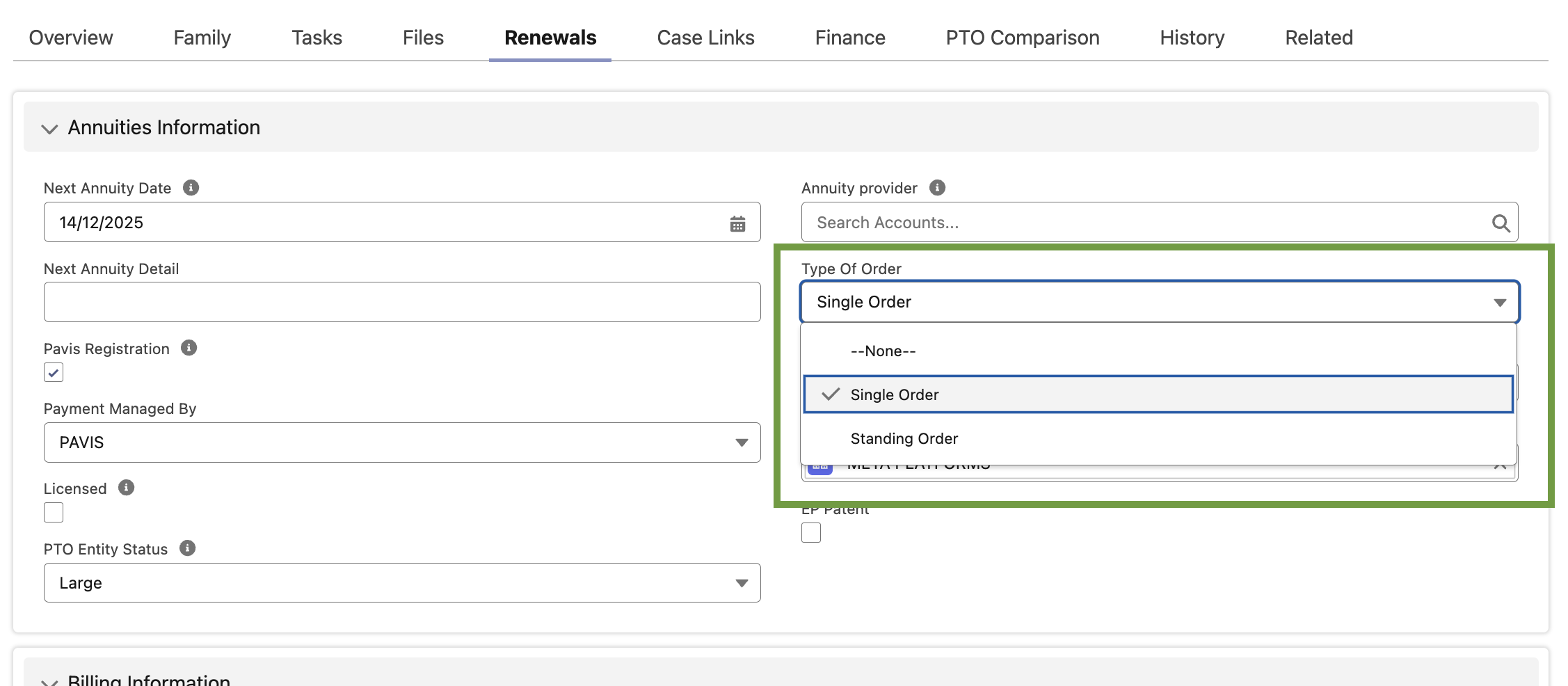
Standing orders are available via Pavis for Patents, Designs, and Utility Models. Trademarks only support single orders. Single or standing order mode can be set on a case-by-case basis, and you can set your default preference in the Pavis Configuration Service (managed by your solution engineer).
When a case is set to standing order mode, this means that no specific renew instruction needs to be entered in EC+, and Pavis will continue to renew the case unless instructed otherwise.
Only one instruction: Do Not Pay
You can stop renewals on a case that is under a Standing Order by sending Pavis instruction with Instruction Type = Do not Pay, and it will be reflected in the renewal status and case status.
Steps:
Open Renewal (Type of Order = Standing Order).
Open Renewal (Type of Order = Standing Order).
Set Instruction = Do not pay and Save.
EC+ calls Pavis, updates Renewal information, and may or may not update the renewal status.
How are future updates to the case transferred?
EC+ starts the Bibliographic Change process as soon as you modify any “key field” on a Case that’s registered with Pavis.
EC+ only triggers this process for cases registered in Pavis (Payment Managed By = Pavis).
| Case Type | Fields |
| Patent (Case status must be Granted or Pending) |
|
| Trademark (Case status must be Registered or Pending) |
|
| Design (Case status must be Granted or Pending) |
|
When one of the above fields is updated, EC+ looks at any existing renewal order and then decides whether to:
amend the case details with Pavis; or
cancel an in-progress order first, then amend.
You don’t choose the flow—EC+ does it for you. You just save your changes.
Changing the Type of Order
Keep EC+ and Pavis aligned when you decide to stop automatic renewals (Standing → Single) or to start automatic renewals (Single → Standing). The system sends the right update to Pavis, when needed, Cancellation, and updates the linked Renewal.
A) Standing → Single (stop automatic renewals)
Open the Case (Patent/Design) with Type of Order = Standing Order and Case Managed By = Pavis.
Change Type of Order to Single Order and Save.
What EC+ does:
Sends the update to Pavis.
If renewal had Instruction = PAY, sets Instruction = To be decided (when within the instruction period).
If Pavis shows the renewal already started, EC+ cancels the order before applying the change.
Result:
If Order Until / Instruction Deadline is in the future → Type of Order updated and Instruction set to To be decided (status unaffected).
If in the past → only Type of Order is updated (no Instruction/Status change).
On success: “Your case has been updated.”
On failure: “Your case cannot be updated because of a Pavis dependency…”
B) Single → Standing (start automatic renewals)
Open the Case (Patent/Design) with Type of Order = Single Order and Case Managed By = Pavis.
Change Type of Order to Standing Order and Save.
What EC+ does:
Sends the update to Pavis.
Sets Instruction = PAY on the active renewal.
When still within the instruction period, EC+ also sets Renewal Status = Instruction Sent.
Result:
If Order Until / Instruction Deadline is in the future → Type of Order updated and Instruction = PAY (status may move to Instruction Sent).
If in the past → only Type of Order is updated (no Instruction/Status change).
Success and error messages behave as above.
Abandon a case
What abandoning means:
You keep the record (for audit/history) but change its Status to an abandoned value (e.g., Abandoned/Withdrawn).
Steps:
- Open the case (Patent/Trademark/Design).
Click Edit and set Status to the correct Abandoned value, and Save.
If the case is registered with Pavis, EC+ sends the cancellation request based on Payment Status.
If there is no open order, EC+ sends a deletion to Pavis.
The Pavis request + outcome are stored for audit in the Pavis Request object.
Delete a Case
What deletion means:
The record is removed from EC+.
Steps:
- Open the case (Patent/Trademark/Design).
In the Actions menu, click Delete → confirm in the pop-up.
- If the case is registered with Pavis, EC+ sends the cancellation request based on Payment Status.
- If there is no open order, EC+ sends a deletion to Pavis.
- The Pavis request + outcome are stored for audit in the Pavis Request object.
- The case record is deleted in EC+
Note: Deletion from a list view is blocked by design so the API step can’t be skipped. Always delete from the record page.