
TABLE OF CONTENTS
- How to behave when you see a PAVIS error
- How Equinox classifies PAVIS errors (the two mandatory checks)
- Pavis Errors Definition
How to behave when you see a PAVIS error
Step 1 — Go to the list view → Patent Renewals with Errors
You will access all the renewals where status = Pavis Error
In the column "Renewal Notification" you will see the error, most of the error are due to a bad or missing data. You can fix manually the error in the right case and wait for the next batch or send it to Pavis manually via the button "Import Case to Pavis" on the renewal record page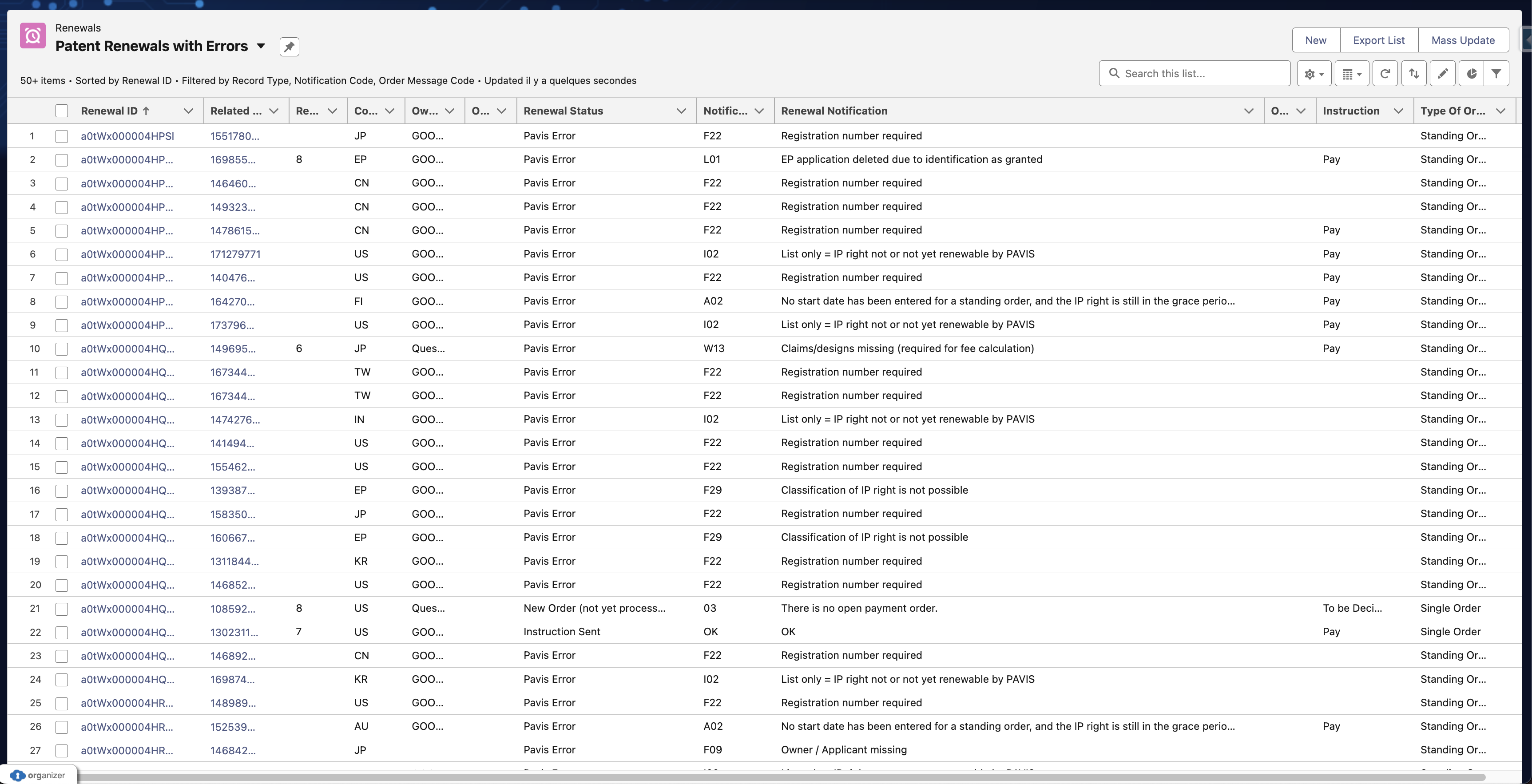
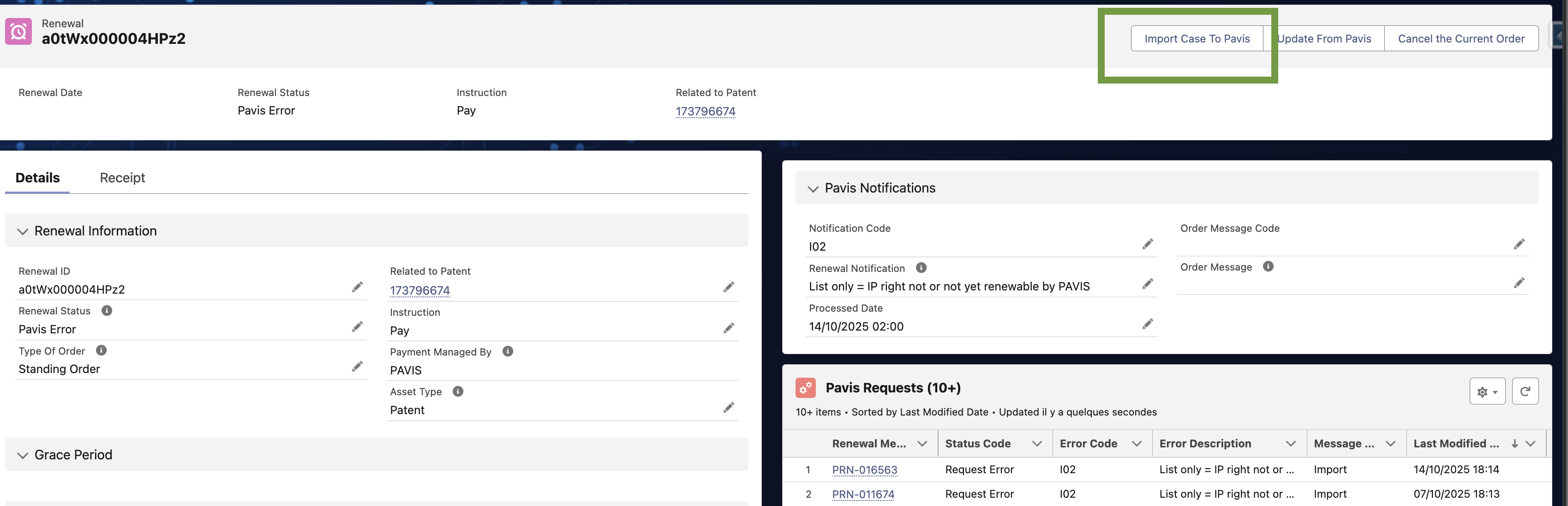
| Request Type | Direction | Definition |
| Import | Equinox to PAVIS | Send cases and instructions to Pavis |
| Preview | PAVIS to Equinox | Get renewal information (dates and price) |
| History | PAVIS to Equinox | Get renewal status |
| Cancellation | Equinox to PAVIS | Send order cancellation request |
Step 2 — If the error is not explicit, check the Pavis Request logs
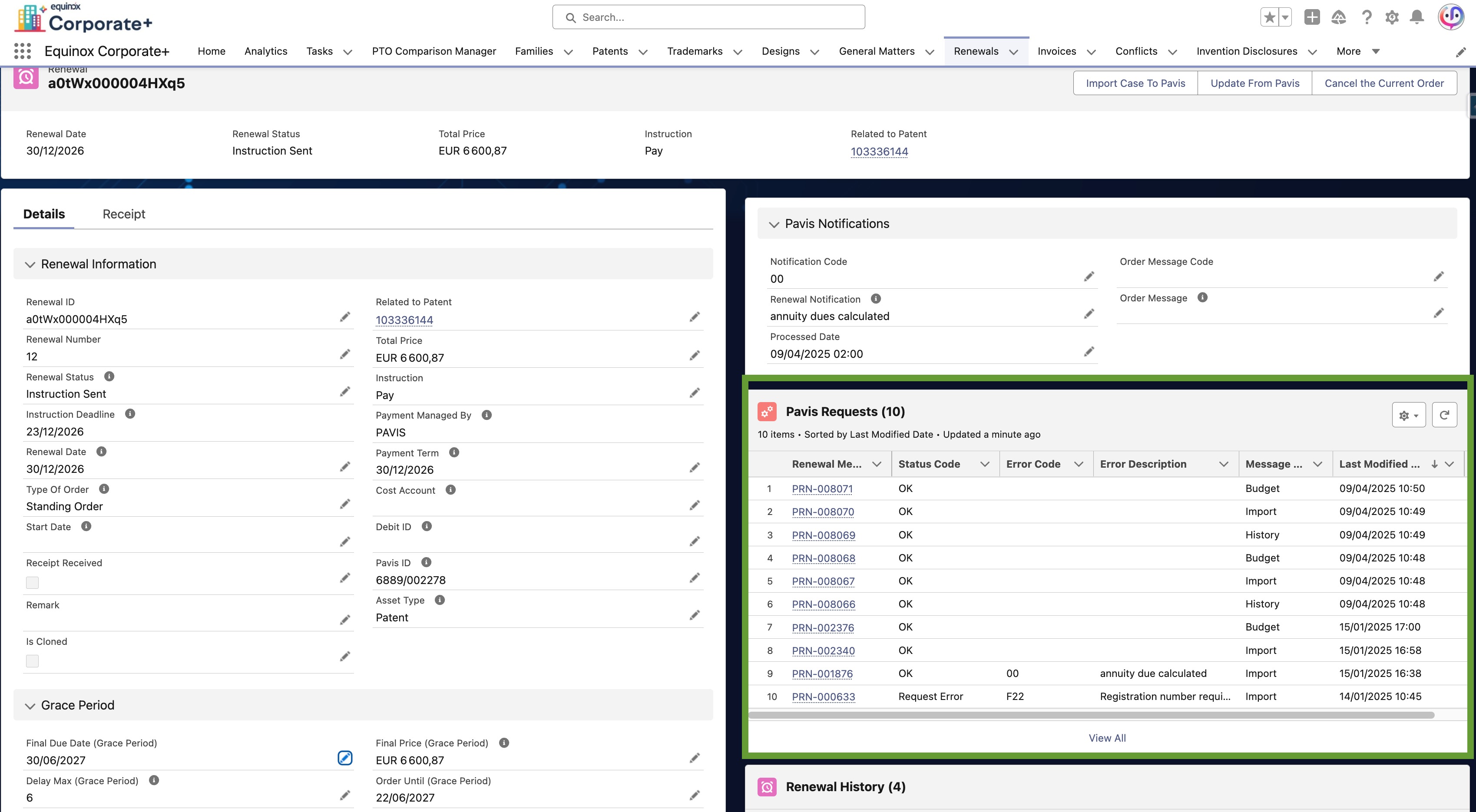
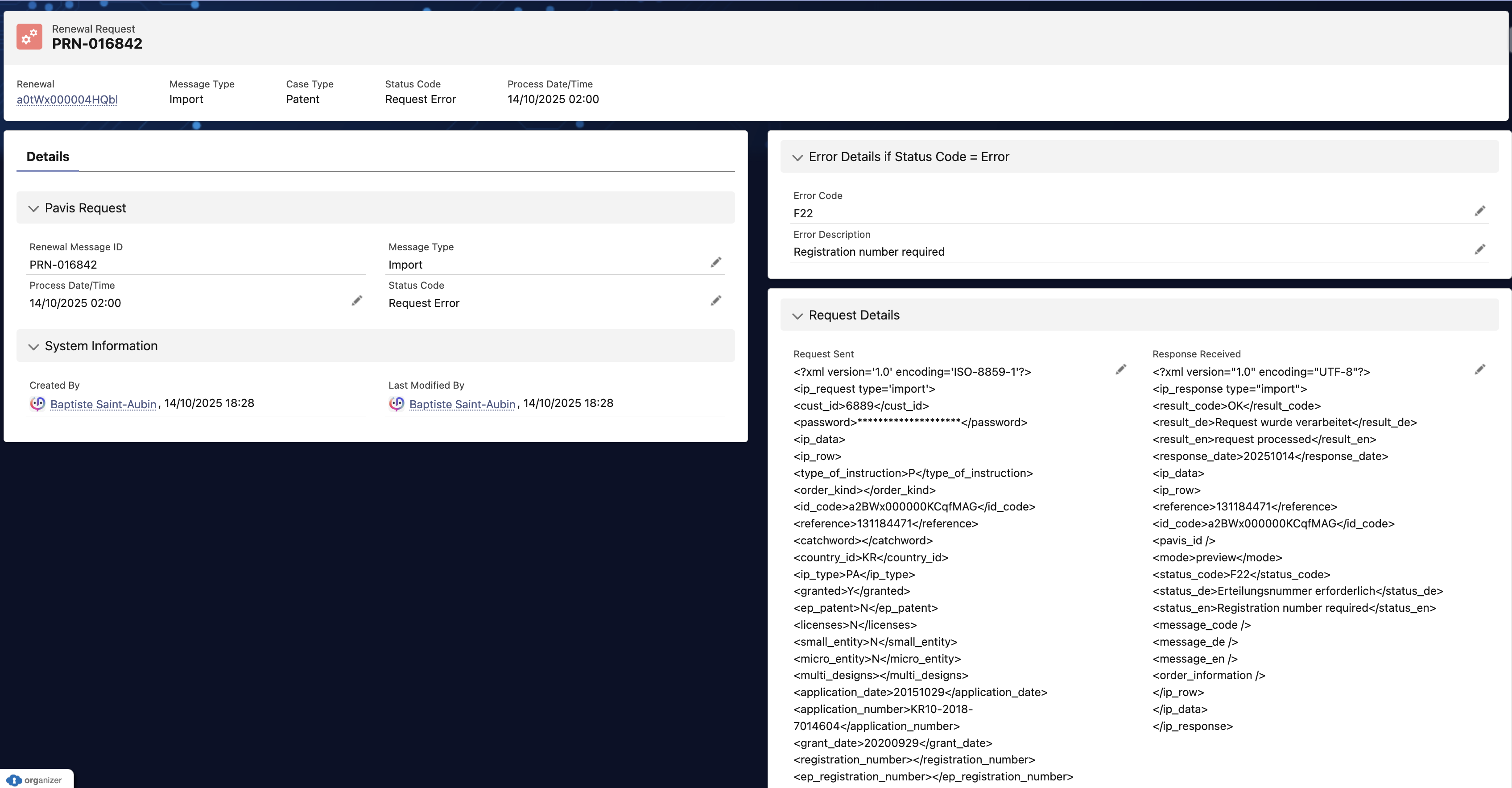
Every time EC+ talks to PAVIS, it automatically creates a Pavis Request record that archives:
Request Type (Import, Preview, History, Status, Cancellation, etc.)
Case Type (Patent, Trademark, Design, Utility)
Status Code (OK / Technical Error / Request Error)
Process Date/Time
Request Sent (full XML/HTTP)
Response Received (full XML/HTTP)
Error Code + Error Message (if any)
Users (Case Manager, Attorney, etc.) can access a list of all requests sent and received, check type, process date, status, and extract the full XML. Pavis Request is linked to the Annuity and visible as a related list and via a dedicated tab/list view.
Why this matters: this is the single source of truth for renewal traffic with PAVIS and for error investigation.
How Equinox classifies PAVIS errors (the two mandatory checks)
For every PAVIS response, EC+ first validates two codes, in this order:
<result_code/>(transport/technical level — applies to the whole response file)OK→ request reached PAVIS and a response file is usableF01–F05→ Technical Error (SSL required / invalid format / service unavailable / auth failed / account locked). Response file is not usable for data updates.
<status_code/>(business result — local to each IP row)Import flow:
OK(e.g., 00) → business processed correctlyF,I,W,L→ Request Error / Warning at the IP-right level (see table below with all expected errors). EC+ only updates the rows with OK; if an error is raised, the renewal Status is updated to Pavis Error
Cancellation flow:
00→ Order cancelled01IP right not available,02order not yet processed,03no open order available.
Pavis Errors Definition
Each table shows the error definition, a practical resolution (what your team should do in EC+), and a short note.
F — Fatal errors (record not imported to PAVIS)
| Code | Error definition | Resolution | Note |
|---|---|---|---|
| F01 | Undefined status | Set Status to N (new), L (deletion), or Z (single payment order). | Only these values are accepted. |
| F02 | Client reference / Case ID missing | Populate unique “Your Reference / Case ID” before export. | Must be unique with identity field. |
| F03 | Country code missing/undefined | Provide valid ST.3 jurisdiction code. | Use ISO/WIPO office code used by PAVIS. |
| F04 | IP right type undefined | Set type to one of: PA, GM, DS, MA, KO, ZE, AW, GR, HN, EA. | Use PAVIS code set. |
| F05 | Grant status undefined | Set grant to Y/N. | Y = granted; N = not granted. |
| F06 | EP grant status undefined | Set ep_grant to Y/N. | Separate from national grant. |
| F07 | Order type undefined | Set order type to E (single), D (standing), or N (list only). | Align with Equinox order picklist. |
| F08 | Application number missing | Enter application number. | Required for identification. |
| F09 | Owner / Applicant missing | Provide owner/applicant party. | Required for portfolio match. |
| F10 | Application date required | Enter application date. | Mandatory for schedule. |
| F11 | Publication < Application date | Correct dates (swap if inverted). | Chronology check. |
| F12 | Grant < Application date | Correct dates (swap if inverted). | Chronology check. |
| F13 | EP grant number invalid/missing | Enter valid EP grant number. | Needed for EP maintenance. |
| F14 | EP validation not possible in country | Update invalid country | Check EP validation rules. |
| F15 | Publication date required | Provide publication date. | Required by PAVIS. |
| F16 | Grant date required | Provide grant date. | Required by PAVIS. |
| F17 | Country list missing/invalid | Supply valid country list; fix invalid codes. | For multi-country entries. |
| F18 | Address code missing | Provide address code (maps to entity record). | Needed to resolve entity. |
| F19 | Address incomplete | Complete mandatory address fields. | Street, city, country, etc. |
| F20 | Address type missing | Set 1=agent, 2=payer, 3=owner, 4=contact. | Use exact numeric codes. |
| F21 | Trademark text missing | Add mark text/keyword.(40 characters max) | Needed for TM identification. |
| F22 | Registration number required | Enter registration number. | Mandatory for many TM/designs. |
| F23 | Base/Start date cannot be calculated | Provide base/start date to compute due date. | Without base no schedule. |
| F24 | Next due date required | Enter next due date. | Needed for payment timing. |
| F25 | Next due date too long ago | Don’t submit expired terms; check grace/end. | Not payable anymore. |
| F26 | National EP in application state | Use EP=EP, category=PA, grant=N, ep_grant=N pre-grant; after grant send national with grant=Y, ep_grant=Y. | Specific EP logic. |
| F27 | Priority date required | Provide priority date. | Required for some calcs. |
| F28 | US filing number incorrect | Correct US filing format. | Match USPTO format. |
| F29 | Classification not possible (Connect) | Ensure reference/identity matches PAVIS portfolio or add case first. | No orders/changes until matched. |
| F30 | Class list required | Provide classes; separate by semicolon. | For TM/design fees. |
| F31 | Application date too far in future | Keep within ≤6 months in future. | Future date cap. |
| F32 | Grant date too far in future | Keep within ≤6 months in future. | Future date cap. |
| F33 | Publication date too far in future | Keep within ≤6 months in future. | Future date cap. |
| F34 | Examination request date too far | Keep within ≤6 months in future. | Future date cap. |
| F35 | Account not activated for ZS | Ask PAVIS CS to activate ZS. | Provider action needed. |
| F36 | Account not activated for ZM | Ask PAVIS CS to activate ZM. | Provider action needed. |
| F37 | EP filing number invalid | Correct EP application number. | Validate format. |
| F38 | DE EP national reg. number required | Provide German EP national reg. number. | Country-specific. |
| F39 | National number IT missing/invalid | Enter valid Italian national number. | Follow office format. |
| F40 | IP right already expired | Don’t submit; review lapse handling. | Out of scope for payment. |
| F41 | Priority date too far in future | Keep within acceptable window. | Future date cap. |
| F42 | Application < Priority date | Fix chronology. | Priority must be ≤ application. |
| F43 | Nat. grant too far in future (MZ/PH/US) | Adjust date within allowed window. | Country-specific cap. |
| F44 | Application number too long | Trim to ≤20 chars. | Length limit. |
| F45 | Registration number too long | Trim to ≤20 chars. | Length limit. |
| F46 | Priority number too long | Trim to ≤20 chars. | Length limit. |
| F47 | National number too long | Trim to ≤20 chars. | Length limit. |
| F48 | Start date for SPC required | Provide SPC start date. | Supplementary protection certificates. |
| F49 | End date for SPC required | Provide SPC end date. | Needed for SPC scope. |
| F50 | Order declined: not in portfolio | Add the case to PAVIS portfolio or correct mapping. | No orders accepted until present. |
| F51 | Order declined: standing order exists | Update standing order or cancel before new order. | Avoid duplicates. |
| F52 | Order declined: status “list only” | Change status if payment is desired and supported. | List-only = tracking only. |
| F53 | Order declined: deleted from portfolio | Re-add to portfolio if still needed. | Portfolio cleanup triggered. |
| F54 | Order declined: existing order | Do not resubmit; amend/cancel existing order. | De-dupe. |
| F55 | EP application not deleted—still payable | Correct lifecycle; ensure EP app state accurate. | Payment still possible. |
| F56 | Family ID required | Provide family identifier. | Needed for linkage. |
| F57 | Sub customer required | Supply sub-customer. | For billing routing. |
| F58 | Sub reference required | Supply sub-reference. | For accounting split. |
| F59 | Cost unit required | Supply cost unit/cost center. | For invoicing. |
W — Warnings (imported, but data may block payment)
| Code | Error definition | Resolution | Note |
|---|---|---|---|
| W01 | Registration number missing | Enter registration number. | May be needed for payment. |
| W02 | Agent data missing | Provide agent data and correct address type coding / agent code per file format. | XML or XLS specifics apply. |
| W03 | Claims/designs changed | Confirm and update numbers if needed. | Impacts fee calc. |
| W04 | Due date discrepancy | Review and align due date with PAVIS calc. | Customer check required. |
| W05 | National grant date needed (MZ/PH/US) | Provide national grant date. | Country-specific requirement. |
| W06 | US Series Code missing | Provide US series code. | US-specific data. |
| W07 | Standing order ⇒ retroactive payment | Verify start year/due date; set start to avoid retro. | Up to 6 months retro. |
| W08 | Annuity >6 months in future—check duplicates | Verify no duplicate order (PAVIS Online vs export). | Cancel one if duplicated. |
| W09 | TM added as international TM | Confirm IB handling. | Avoid duplicate entries. |
| W10 | Please submit latest renewal certificate | Upload recent certificate to Equinox & send to PAVIS. | Evidence request. |
| W11 | Renewal in progress or finished | Don’t re-order; track status. | Payment already underway. |
| W12 | TM dropped; already in portfolio as IB | Use existing IB record; don’t add duplicate. | De-dupe in portfolio. |
| W13 | Claims/designs missing | Provide counts for fee calculation. | Required to price. |
| W14 | Payment declined—order type undefined | Set valid order type. | E/D/N only. |
| W15 | Payment declined—invalid order type for IP | Choose compatible order/IP combo. | Check PAVIS rules. |
| W16 | Payment declined—due date too far | Bring due date within allowed horizon. | Future window limit. |
| W17 | Number of items missing | Provide number of items. | Needed for fees. |
| W18 | National number IT missing/invalid | Correct Italian national number. | Office format check. |
| W19 | Different IB country of origin? | Email PAVIS with correct origin if not DE. | Can change fees. |
| W20 | Country code was changed | Verify change or contact PAVIS if wrong. | Data integrity alert. |
| W21 | Renewal declined—national grant unknown | Submit national grant date via email. | Needed to process. |
| W22 | Agent country ≠ payment country | Confirm setup or correct party data. | May affect process. |
| W23 | PAVIS due date ≠ order file value | Reconcile discrepancy. | Use PAVIS calc or amend. |
| W24 | Agent was amended | Acknowledge change; ensure correct agent. | Inform stakeholders. |
| W25 | Start year removed (base date amended) | Review recalculated start year. | Lifecycle adjusted. |
| W26 | Country list missing/invalid (ARIPO Patents) | Provide valid ARIPO country list. | ARIPO-specific. |
L / I — “List only” (imported, not payable; immediate attention)
| Code | Error definition | Resolution | Note |
|---|---|---|---|
| I01 | Country not renewable by PAVIS | Keep as list-only or arrange local agent payment. | PAVIS doesn’t service this country. |
| I02 | IP right not (yet) renewable by PAVIS | Track only; use agent/alternative route until eligible. | e.g., still in application phase. |
| I03 | Type of IP right not renewable | Correct invalid country/IP combo or keep list-only. | e.g., EP patent in USA impossible. |
| L01 | EP application deleted as granted | Update lifecycle to granted; set national maintenance. | Transitions EP→national. |
A — Payment order notifications (advisory/next-step)
| Code | Error definition | Resolution | Note |
|---|---|---|---|
| A01 | Check existing order—cancellation required? | If order type/start year changed, review open order and cancel if superseded. | Avoid double orders. |
| A02 | Standing order ⇒ retroactive payment | If unwanted, set a start year or notify PAVIS to disable retro for portfolio/case. | Retro up to 6 months. |
| A03 | Identical order already exists | Don’t submit a new one; manage the existing PAVIS order. | PAVIS Connect users see this. |
| A04 | Imported start year ≠ due date of existing order | Reconcile start year with existing order’s due date. | Align to prevent mismatch. |
| A05 | Check existing order (renewal data amended) | Review whether to update or cancel current order. | Data changed after order. |
| A06 | Declined—due date not payable (Lead times, Connect) | Move due date inside lead time window; resubmit. | Lead time rule enforced. |
| A07 | Will be processed with surcharge—grace period | Confirm surcharge acceptance or adjust plan. | In grace; fees higher. |