
New Features
A) Docketing: Intent to Use (Trademarks)
What it does
This feature introduces automatic task generation for trademarks where the "Use in Commerce" field is set to Intent to Use (specific to US). When a qualifying trademark record is created or updated with a relevant base date, the system now automatically selects and triggers the appropriate docketing rules — eliminating the need for manual task setup in Intent to Use workflows.
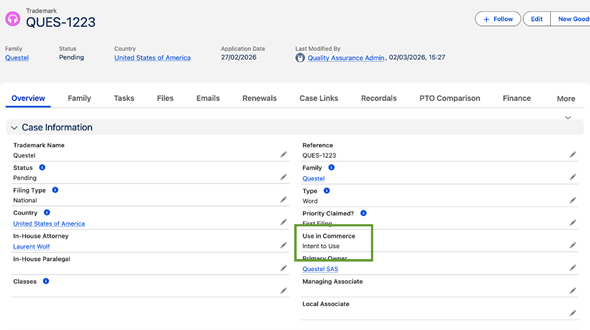
Automatic Task Generation on Record Creation
When a trademark is created with Use in Commerce = Intent to Use, the system automatically evaluates docketing rules and generates tasks, with this logic:
The system filters docketing rules using a multi-condition logic to ensure only the correct rules are applied:
- Only Enabled docketing rules are considered
- Case Type must equal "Trademark"
- Must Have Flags must equal "Intent-to-Use"
- Country Code on the rule must match the trademark's Country Code
- Open Date rules are always included; all other date-based rules are included only if the corresponding date field is populated on the record
Task Generation on Record Update
Tasks are also re-evaluated and generated when an existing Intent to Use trademark is updated in the following scenarios:
- A new base date (Priority, Application, Publication, Registration, or Expiry) is populated or changed
- The "Use in Commerce" field is updated to Intent to Use
Note: If Use in Commerce is changed away from Intent to Use, no new Intent to Use tasks are generated. Existing tasks are preserved.
Batch Processing Support
The list view "Generate Tasks" button now includes Intent to Use logic in its batch processing, applying the same rule selection and Only Future Tasks filters across all trademark records.
Add Office Action / Pre-Set Filtering
When opening the "Add Office Action / Pre-Set" dialog on an Intent to Use trademark, docketing rules where Must Have Flags = Intent-to-Use AND Base Date = Set Date are displayed, in addition of the regular ones
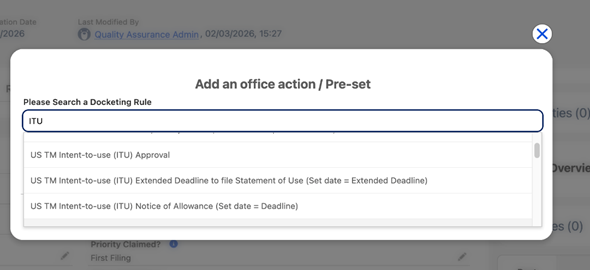
Custom Rule Support
Clients who create custom docketing rules and pre-sets with Must Have Flags = Intent-to-Use will benefit from the same automatic generation behaviour, provided the rule is enabled and the country code matches.
B) Docketing: Internal Due Date Management
What it does
Tasks generated by the IPMS law engine have historically included a single due date, the official legal deadline. This feature introduces a second date, the Internal Due Date, designed to help teams plan their workload earlier and avoid last-minute pressure. The internal date is calculated automatically as a configurable offset before the official due date, and keeps itself in sync whenever the official date changes.
A Second Due Date on Every Task
Each automatically generated task can now display both the official due date and an Internal Due Date (labelled "Final Due Date" in the interface). The internal date is set X days before the official due date and is intended for internal workload planning, reminders, and prioritization. It does not affect any legal deadline.
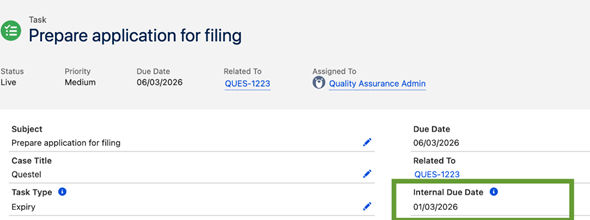
Two-Level Configuration
Admins can configure the internal due date offset at two levels, giving full flexibility:
- Global (Docketing Configuration): A master toggle to enable or disable the feature entirely, plus a default offset in days (default: 90 days). This setting applies to all tasks unless overridden at the pre-set level.
- Per Pre-Set Task: An optional offset field on individual pre-set tasks. When filled, it takes priority over the global setting. When left blank, the system falls back to the global offset.
If neither level has an offset configured, no Internal Due Date is generated.
Calculation Formula
Internal Due Date = Official Due Date − Offset (days) |
For example, if the official due date is 15 November 2025 and the offset is 10 days, the Internal Due Date will be set to 5 November 2025.
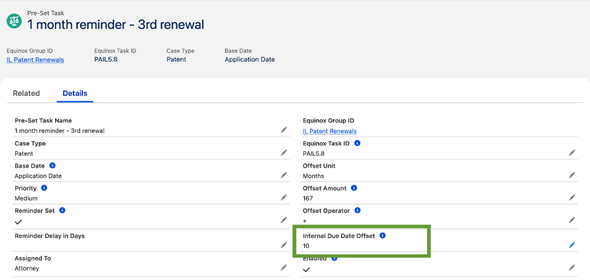
Automatic Recalculation on Due Date Changes
If the official due date is updated — whether manually or by the system — the Internal Due Date is automatically recalculated using the same offset. This applies even if the Internal Due Date had been previously set.
Global Master Toggle
The feature can be switched off entirely at the organization level. When the "Enable Internal Due Date" setting is unchecked, no Internal Due Date is generated on any task, regardless of any offset configured at the pre-set level.
Offset Hierarchy
When the system determines which offset to apply, it follows this priority order:
- Pre-Set Task offset — if a value is set on the specific pre-set task, it is used.
- Global offset — if the pre-set task has no offset, the Docketing Configuration default is used.
- No Internal Due Date — if neither level has a value, the field is left empty.
C) IP Subtype Redesign (Patents, TMs, and Designs)
What it does
Trademark:
This release introduces a redesigned trademark subtype model, giving users a richer and more precise way to categorize trademark cases. Rather than relying on a single legacy filing type field, trademarks can now be classified using three dedicated fields
- Filing Type
- Priority Claimed
- Madrid Designation Type
which together drive more accurate task generation, cleaner family trees, and streamlined extension workflows.
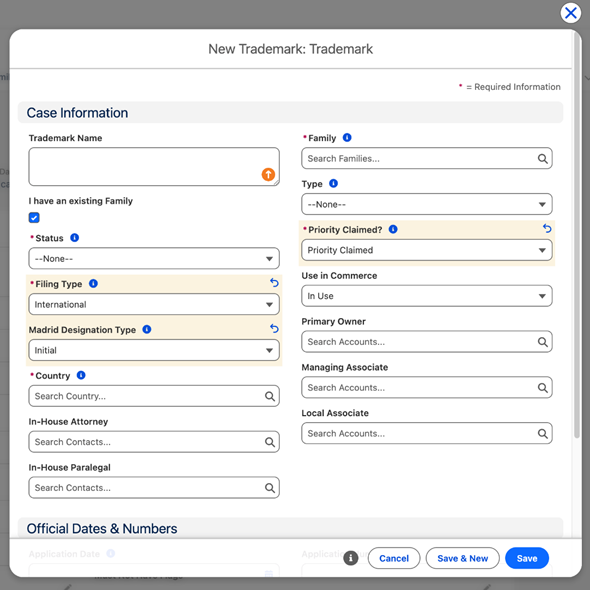
All new trademark fields:
The following fields have been added to the Trademark object to support a more structured classification model:
Filing Type (required) — Indicates the route by which the trademark was filed. Values: National, International. Drives jurisdictional workflows, renewal rules, and task generation.
Priority Claimed (required) — Describes whether this trademark claims priority from an earlier filing. Values: First Filing, Priority Claimed, No Priority Claimed. Used for tracking priority chains and managing deadlines.
Madrid Designation Type — Only applicable for Madrid System (WIPO) filings. Values: Initial, Subsequent. Visible on the record only when Filing Type = International and country is not WO.
Sub Status — Secondary status field for tracking internal transitional states. Values: Opposed, To be Abandoned, Sold, Not Filed. Visible when a reference is linked to the record.
Use in Commerce — US-specific field, visible when country = US. Values: In Use (default), Intent to Use. Controls subtype and triggers the appropriate task generation, including Intent to Use tasks.
Automatic Classification via Formula Fields
Equinox Type is now computed automatically from the classification fields above, replacing the legacy Equinox Filing Type field that previously drive pre-sets and docketing rules:
Possible values: First Filing, Claiming Priority, National Right of Madrid, Intent-to-Use.
Old Filing Type | Country | Priority Trademark / Priority Date | Nouveau Filing Type | Nouveau Priority Claimed | Madrid Designation Type |
First Filing | WO | empty | International | First Filing | empty |
First Filing | WO | filled | International | First Filing | empty |
First Filing | other than WO | empty | National | First Filing | empty |
First Filing | other than WO | filled | National | Priority Claimed | empty |
Claiming Priority | WO | empty or filled | International | Priority Claimed | empty |
Claiming Priority | other than WO | empty or filled | National | Priority Claimed | empty |
National Right of Madrid | any | empty | International | No Priority Claimed | Initial |
National Right of Madrid | any | filled | International | Priority Claimed | Initial |
Subsequent | any | empty | International | No Priority Claimed | Subsequent |
Subsequent | any | filled | International | Priority Claimed | Subsequent |
Impact on Task Generation
The law engine now uses the new Equinox Type formula field to select docketing rules and generate pre-set tasks. The legacy Equinox Filing Type field has been deprecated for this purpose. All task generation logic has been updated accordingly across all case types (Patents, Trademarks, Designs). This change is fully transparent to end users — task generation continues to work as expected.
Updated Extension Workflows
Both the National and International extension workflows now automatically populate the new classification fields when a trademark is created through those flows, eliminating the need for manual data entry.
National Extension Workflow:
- Filing Type is set to National automatically (or International if the country is WO)
- Priority Claimed is set based on the user's selection in the first workflow screen
- Priority Date is automatically copied from the priority trademark's Application Date when Priority Claimed is selected
International Extension Workflow:
- Filing Type is set to International automatically
- Priority Claimed is set based on the user's selection in the first workflow screen
- Madrid Designation Type is set to Initial or Subsequent based on the user's selection
- Priority Date is automatically copied from the priority trademark's Application Date when Priority Claimed is selected
Patent & Design
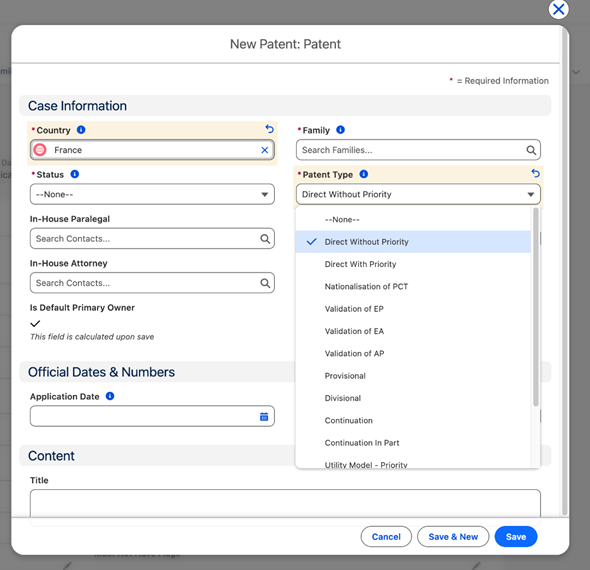
We have just updated the labels of the Patent Type and Design type picklist:
- First Filing is now labelled Direct without priority
- Claiming Priority is now labelled Direct with priority
Enhancements
Pavis Integration: Renewal Layout & Pavis Request improvements (UX/UI based on feedback)
Case Links: Various Improvements (UX/UI based on feedback)
Email Management: Skip Signature Asset
Prevent email signature images and GIFs from being stored as attachments when processing inbound emails.Invoice Management: Adjust Invoices
Thank you for choosing Equinox Corporate+!