
Overview
German law (ArbNErfG) mandates a specific calculation methodology for inventor remuneration. The German Remuneration Calculator is a guided, multi-step wizard that walks you through the required calculation and creates the resulting Reward record automatically, keeping you compliant with German legal requirements.
The calculator is launched from the Add Reward button on a Patent Family record and applies to Patents only.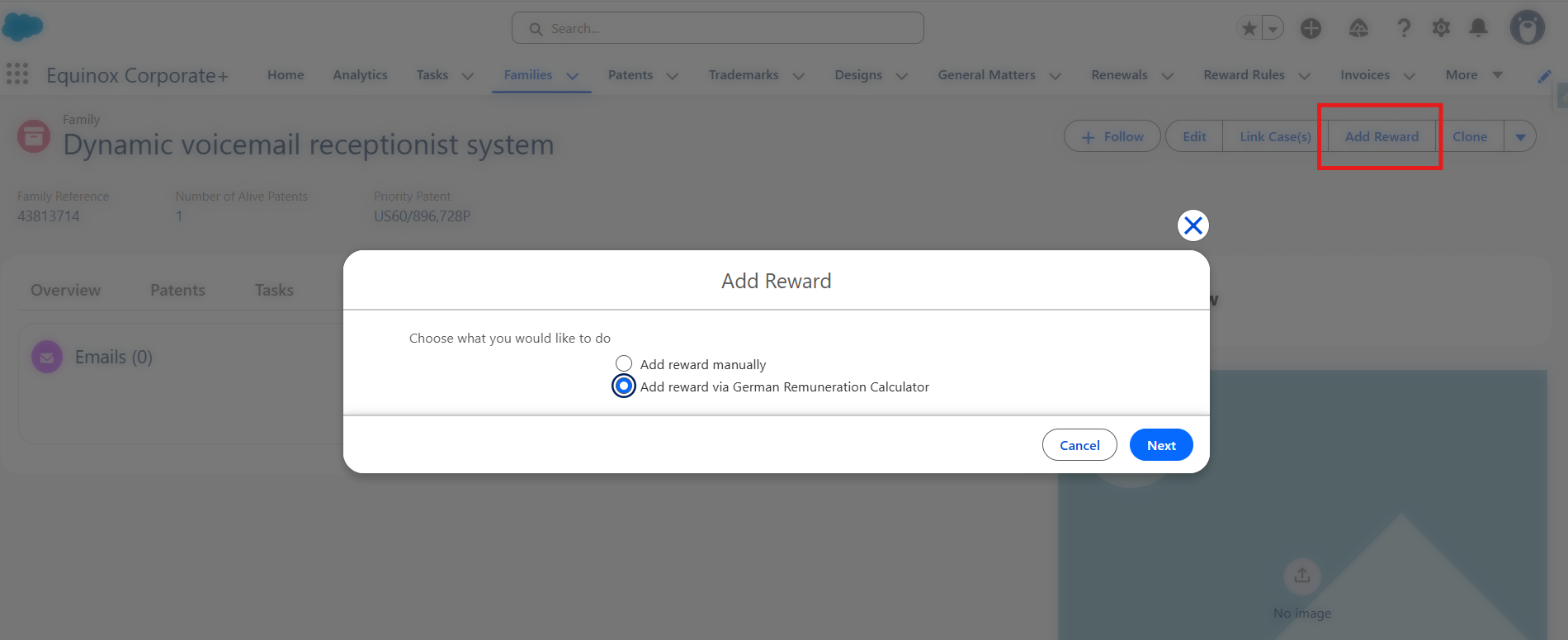
Automatic Reminders (Pre-Set Tasks)
The system automatically creates a pre-set task to remind users to calculate and pay rewards to eligible German inventors. This task is created for all patents, across all jurisdictions and filing types, with:
- Name: "Calculate German Remuneration for eligible inventors"
- Trigger: Set Date (Base Date)
- Offset: +2 weeks from the set date
- Priority: Medium
The Calculation Wizard — Step by Step
Step 1 — Choose Reward Type
From the Patent Family record, click Add Reward and select "Add reward via German Remuneration Calculator", then click Next.
Step 2 — Invention Value Calculation
Select the calculation method and enter the relevant values to determine the invention's economic value.
| Method | How it works |
|---|---|
| Licensing Analogy | Enter the Annual Turnover (B) generated from the invention, then select the License Rate (L) (industry category). The system automatically calculates the Invention Value (E) by applying progressive rate multipliers across defined turnover ranges. The result is read-only. |
| Operational Benefit | Enter the Invention Value (E) directly — it represents the cost savings generated internally by the invention. |
| Estimation Method | Enter the Invention Value (E) directly — it represents the estimated cost of acquiring a similar invention externally. |
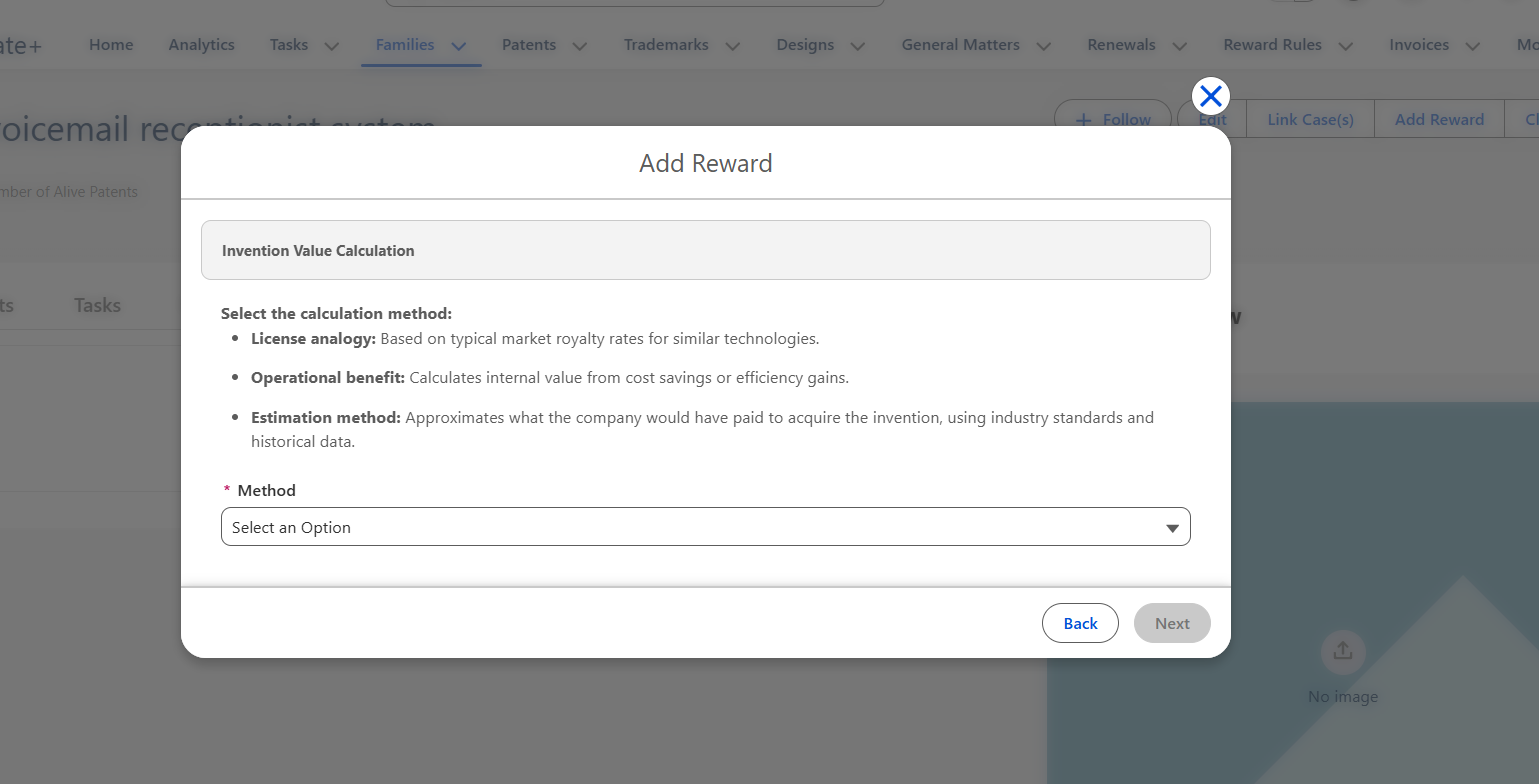
Click Next (available only once all required fields are complete). Click Back to return to Step 1.
Step 3 — Employee Share Calculation
Select the inventor who will receive this reward and define their contribution to the invention.
The lookup is filtered to show only contacts linked to inventors in the current family. The contact's country of residence and nationality are displayed under their name.
The following fields are auto-populated from the inventor's record where available, but can be adjusted:
- Employee Contribution to Solution — How independently the inventor arrived at the invention (higher = more self-directed).
- Solution Contribution — The originality and extent of their technical input (higher = more novel and self-developed).
- Role and Position of Employee — Their technical seniority and training (higher = less expected to invent at that level).
- Employee Inventorship Share — Their percentage contribution to the invention.
The system then calculates the Employee Share (A) automatically:
- Each of the three contribution fields maps to a numeric grade (configured by your administrator).
- The three grades are summed.
- The sum maps to an Anteilsfaktor rate (a percentage, also configured by your administrator).
- Employee Share (A) = Anteilsfaktor Rate × Employee Inventorship Share
Click Next (available only once all required fields are complete). Click Back to return to Step 2.
Step 4 — Compensation Summary
A read-only summary of all values from the previous steps is displayed, followed by the calculated Compensation Result:
Compensation Result (V) = Invention Value (E) × Employee Share (A)
You can review and, if necessary, manually override the Compensation Result. You can also set the Due Date, add a Note, and confirm the Status (default: Due).
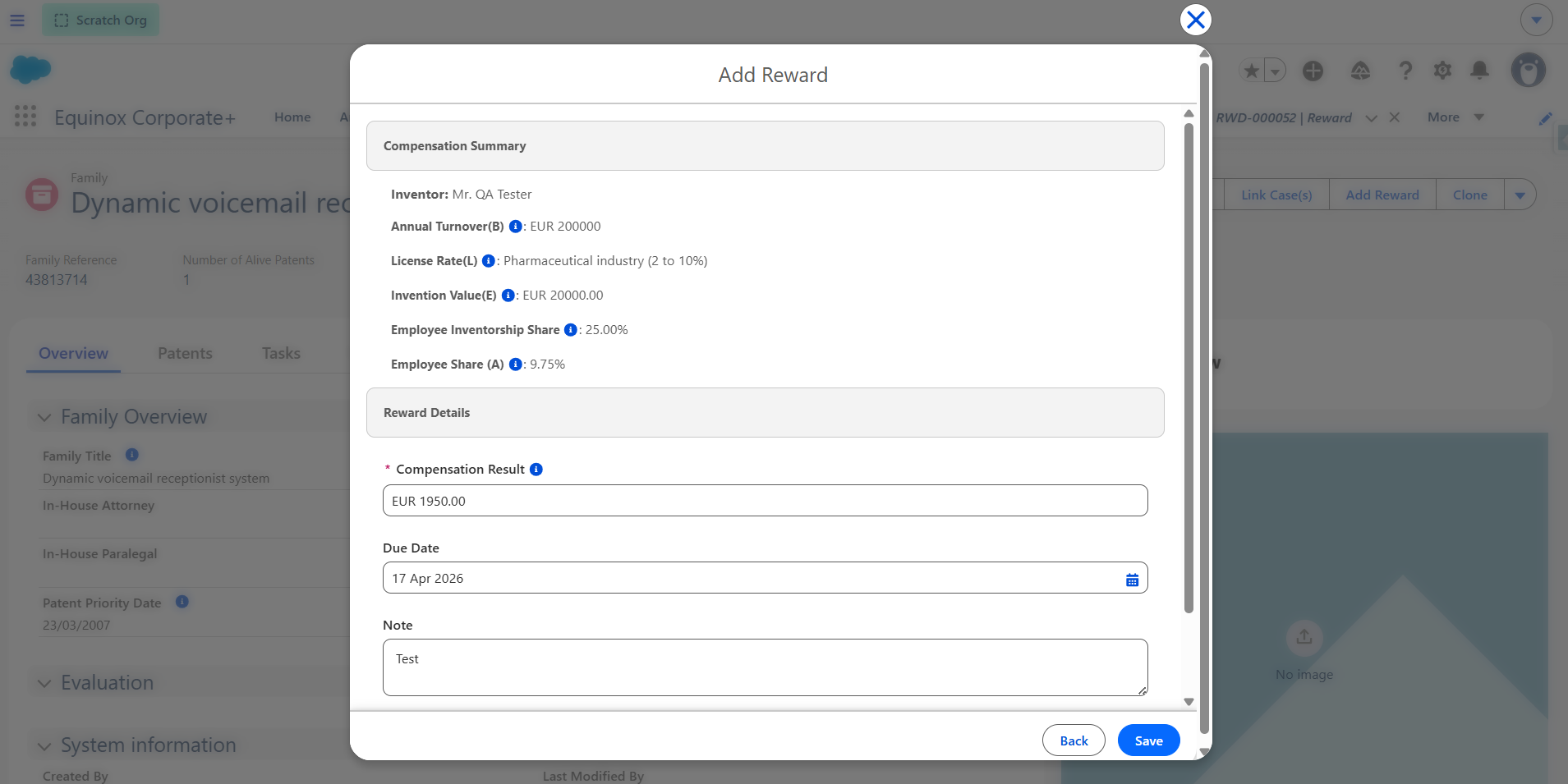
Note: The Compensation Result cannot exceed 999,999.99. If the calculated value exceeds this, an error is displayed and the Save button is disabled until you adjust the amount.
Click Save to create the Reward record. Click Back to return to Step 3.
Step 5 — Reward Created
A success message is displayed: "Your Reward Has Been Successfully Added." You are redirected to the newly created Reward record, which is linked to the inventor and the family.
Frequently Asked Questions
Can I use the German Calculator for Trademarks or Designs?
No. The German Remuneration Calculator applies to Patent Families only.
Can I run the calculator for multiple inventors on the same family?
Yes. Run the wizard once per inventor — each run creates a separate Reward record for the selected inventor.
What is the Licensing Analogy method and how does the Invention Value get calculated?
The Invention Value is calculated by applying a progressive license rate across defined turnover ranges. For example, with an Annual Turnover of €25,000,000 in the Electrical industry, the system breaks the turnover into ranges (0–3M, 3–10M, 10–20M, 20–25M), applies the industry license rate and a range multiplier to each band, and sums the results. The thresholds, multipliers, and license rates are all configurable by your administrator.
Can I edit the Compensation Result calculated by the system?
Yes. The Compensation Result field is editable in Step 4, allowing you to manually adjust the final amount before saving.