
Overview
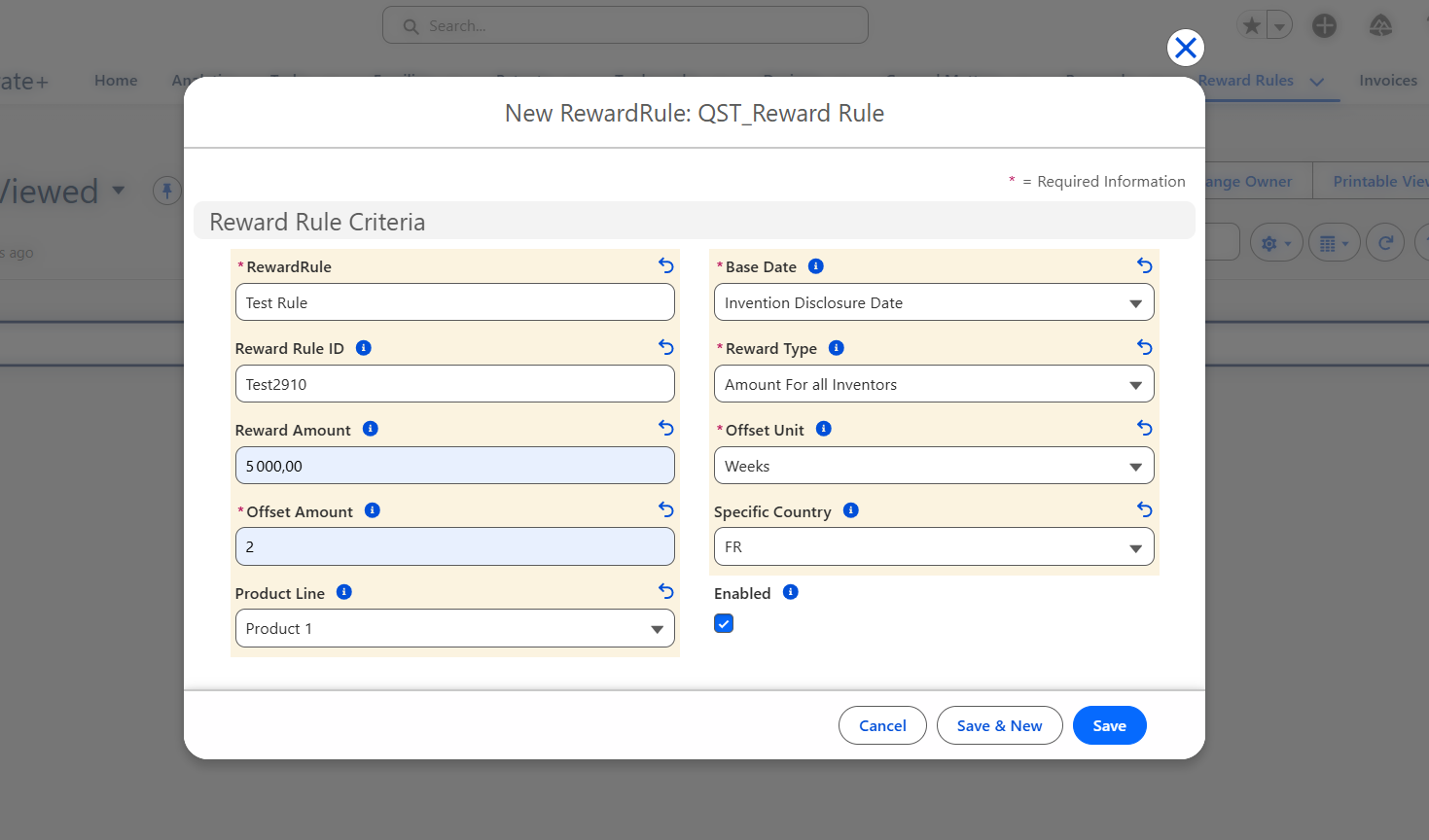
A Reward Rule defines the conditions under which a reward is automatically generated and how its amount is calculated. Rules are evaluated each time a qualifying event occurs on a patent, invention disclosure, or contract for the first time in its family.
Creating and managing Reward Rules requires Questel Administrator, Client Administrator, Case Manager, Attorney, or Paralegal access.
Reward Rule Fields
| Field | Description |
|---|---|
| Rule Name | A unique, descriptive name to identify the rule. |
| Reward Rule ID | An optional unique identifier (max 20 characters). |
| Base Date | The milestone event that triggers the reward: Invention Disclosure Date, Application Date, Publication Date, Grant Date, or First Licensing Date. |
| Specific Country | Restricts the rule to patents from a specific country. Leave empty to apply to all countries. |
| Offset Amount & Offset Unit | Defines when the reward is due, relative to the Base Date. Example: 3 Months after the Application Date. Unit options: Days, Weeks, Months. |
| Product Line | Restricts the rule to a specific product line. Leave empty to apply to all product lines. |
| Reward Type | The calculation method: Inventorship Share, Amount for All Inventors, or Inventor Profiles. |
| Reward Amount | The monetary value of the reward. Required when Reward Type is Inventorship Share or Amount for All Inventors. Not used for the Inventor Profiles method (amounts are set on individual profiles). |
| Enabled | Toggle to activate or deactivate the rule. Only enabled rules are evaluated during automatic reward creation. Checked by default. |
| Trigger Condition | An optional free-text expression (advanced) that further restricts which inventors or cases are eligible. Leave blank for the rule to apply to all eligible inventors unconditionally. See the Trigger Conditions article for syntax guidance. |
How to Create a Reward Rule
- Navigate to the Reward Rules tab.
- Click New.
- Enter a Rule Name.
- Select a Base Date — this is the trigger event for this rule.
- Set the Offset Amount and Offset Unit to define when the reward becomes due.
- Optionally, restrict the rule by Specific Country and/or Product Line.
- Select the Reward Type.
- If the Reward Type is Inventorship Share or Amount for All Inventors, enter the Reward Amount.
- If the Reward Type is Inventor Profiles, leave the Reward Amount empty and add Inventor Profile records from the related list (see the Inventor Profiles article).
- Ensure Enabled is checked, then save.
Note: A Reward Rule set to Inventor Profiles cannot be enabled until at least one Inventor Profile record is linked to it.
Due Date Calculation
The reward's due date is calculated automatically using the formula:
Due Date = Base Date + Offset Amount (in Offset Unit)
For example, a rule with Base Date = Application Date, Offset Amount = 3, Offset Unit = Months will set the due date to 3 months after the patent's application date.
Frequently Asked Questions
Can I have multiple rules for the same base date?
Yes. You can have multiple active rules for the same base date with different country or product line restrictions. The system will evaluate all enabled rules and create a reward for each matching rule.
Can I disable a rule without deleting it?
Yes. Uncheck the Enabled field on the Reward Rule record. Disabled rules are ignored during automatic reward creation but remain available to re-enable later.
What happens if both Country and Product Line are left empty on a rule?
The rule applies to all countries and all product lines — it will fire for every eligible patent or case regardless of country or product line.