
Overview
When you run an extension workflow (national or international) for a Trademark or Design and indicate that priority is being claimed, the system automatically creates the required Case Link between the new case and the originating case — and populates the priority date and priority type fields without any manual steps.
This feature is available to Standard Users (Paralegals and Attorneys) and Administrators.
The Priority Type Field
A Priority Type field is available on Patent, Trademark, and Design records. It reflects the number of priority claims currently associated with the case and is maintained automatically at all times.
| Value | Meaning |
|---|---|
| No Priority (default) | The case does not claim any priority. |
| Single Priority | The case has exactly one Priority Application case link. |
| Multiple Priority | The case has two or more Priority Application case links. |
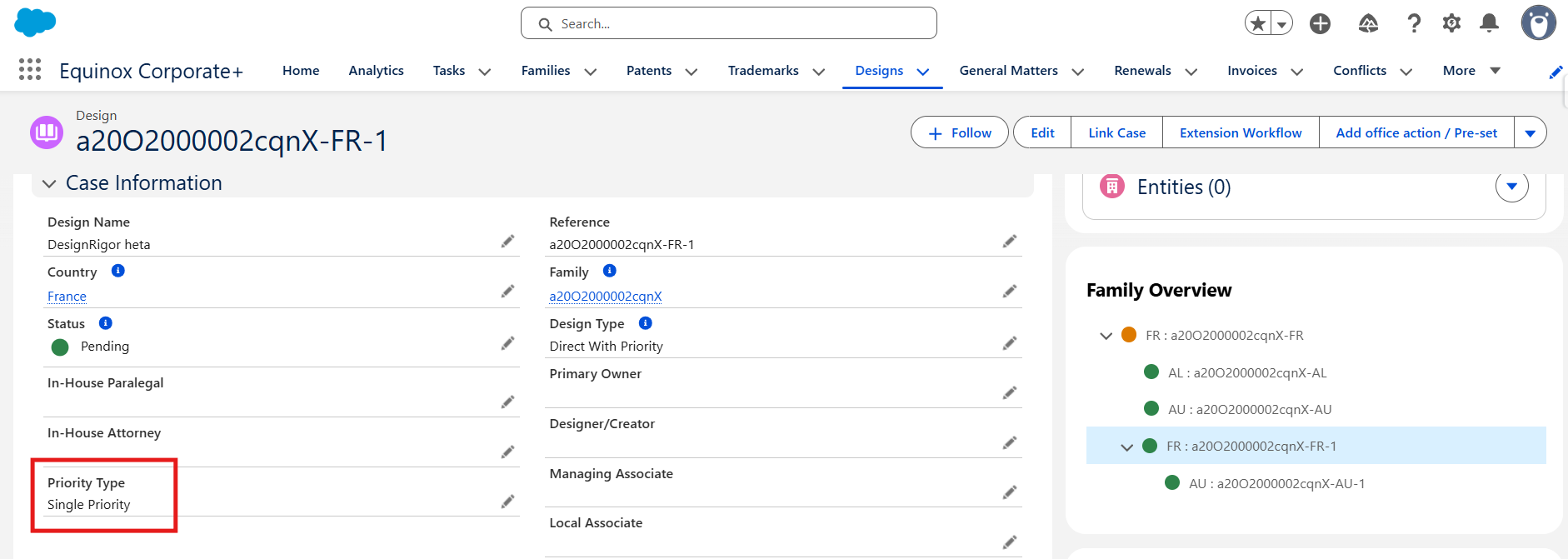
Note: The Priority Type is recalculated automatically every time a Priority Application Case Link is created or deleted, regardless of how the link was created (extension workflow, manual button, or copy feature).
How It Works During an Extension Workflow
- Start a Trademark or Design extension workflow (national or international).
- In the workflow, set Priority to "Priority Claimed".
- Select the originating case using the Priority lookup field.
- Complete and submit the workflow.
Once the workflow completes and the new case is created, the system automatically:
- Creates a Case Link between the new case and the originating case, with the relationship type set to Priority Application.
- Sets the Priority Date on the new case to the Application Date of the originating case.
- Sets the Priority Number on the new case to the Application Number of the originating case.
- Evaluates the total number of Priority Application links on the new case and sets the Priority Typeaccordingly:
- 1 link → Single Priority
- 2 or more links → Multiple Priority
If you do not select "Priority Claimed" in the workflow, no Case Link is created and the Priority Type remains No Priority.
Supported Workflows
- Trademark National Workflow
- Trademark International Workflow
- Design National Workflow
- Design International Workflow
Automatic Priority Type Maintenance Outside of Workflows
The Priority Type field is kept up to date beyond extension workflows. Any time a Priority Application Case Link is created or deleted — whether through the manual Link Case(s) button, the copy links feature, or an automated workflow — the system recalculates the Priority Type:
| Number of Priority Application Links | Priority Type set to |
|---|---|
| 0 | No Priority |
| 1 | Single Priority |
| 2 or more | Multiple Priority |
Frequently Asked Questions
Does this work for Patents as well?
The Priority Type field exists on Patents, but the automatic Case Link creation during extension workflows applies to Trademarks and Designs. Priority links on Patents can be created manually using the Link Case(s) button, and the Priority Type will be updated accordingly.
What happens if a new case already has a Priority Application link before the workflow runs?
The system adds the new link from the workflow to the existing one. If the total then reaches 2 or more, the Priority Type is set to Multiple Priority.
Can I manually adjust the Priority Type?
No. The Priority Type field is fully managed by the system and is not editable by users. It reflects the actual number of Priority Application links at all times.
If I delete a Priority Application Case Link, does the Priority Type update?
Yes. Deleting a Priority Application link triggers an immediate recalculation. If only one link remains, the type changes to Single Priority. If none remain, it changes to No Priority.
Where can I see the Priority Case Links once they are created?
They appear in the Case Links tab on the case record, under the Priority Applications and Applications Claiming Priority from This Case sections.