
Overview
Every case record has a dedicated Case Links tab that displays all relationships that have been created for that case. Links are grouped into separate sections by relationship type, making it easy to distinguish between, for example, Terminal Disclaimer relationships and Priority relationships at a glance.
The Case Links tab is available on all eight asset types: Patent, Trademark, Design, Third Party Right, General Matters, Conflicts, Invention Disclosure, and Family.
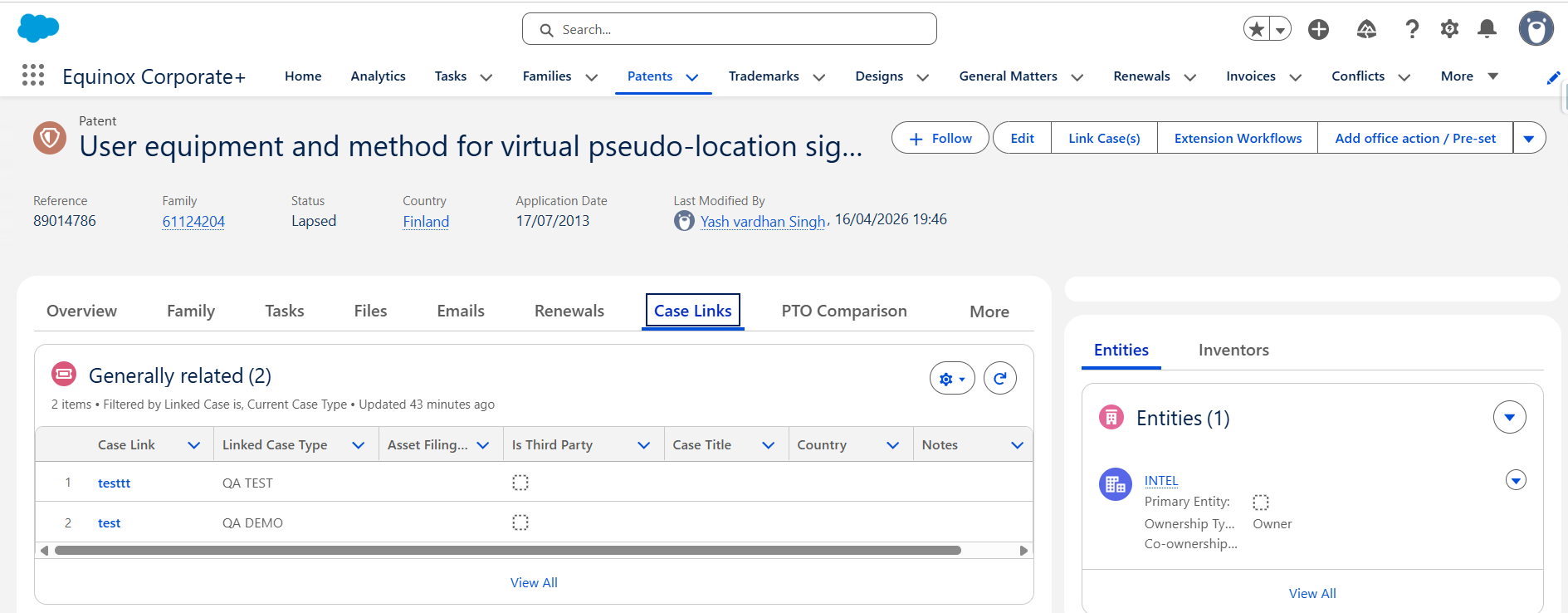
How Links Are Organised
Each relationship type appears as its own grid. Only grids that contain at least one link are shown — if no links of a certain type exist, that section is not displayed. All grids are sorted by creation date ascending by default.
Relationship Sections and Their Columns
Controlling Patents
Shown when the current case is the controlling patent in a Terminal Disclaimer relationship.
- Case Link (reference with a short link to the case)
- Linked Case Type
- Asset Filing Type
- Country
- Expiry Date
- Notes
Dependent Patents
Shown when the current case is the dependent patent in a Terminal Disclaimer relationship.
- Case Link
- Linked Case Type
- Asset Filing Type
- Country
- Expiry Date
- Notes
Priority Applications
The originating cases from which the current case claims priority.
- Case Link
- Linked Case Type
- Title / Name
- Country
- Status
- Application Number
- Application Date
- Grant / Registration Number
- Grant / Registration Date
- Is 3rd Party
- Notes
Applications Claiming Priority from This Case
Cases that have identified the current case as their priority application.
- Case Link
- Linked Case Type
- Title / Name
- Country
- Status
- Application Number
- Application Date
- Grant / Registration Number
- Grant / Registration Date
- Is 3rd Party
- Notes
Generally Related
The default relationship type, used for general associations and also for Conflict links.
- Case Link
- Linked Case Type
- Asset Filing Type
- Is 3rd Party
- Title (of the linked case)
- Country (of the linked case)
- Notes
Seniority Trademark
Earlier trademarks from which the current EU Trademark claims seniority. Visible only when the current case's country is EM (EUIPO).
- Case Link
- Case Title
- Country
- Application Date
- Application Number
- Notes
EU Trademark Claiming Seniority
EU Trademarks that claim the seniority of the current case. Visible only when the current case's country is in Europe.
- Case Link
- Case Title
- Country
- Application Date
- Application Number
- Notes
The "Is 3rd Party" Column
Where present, the Is 3rd Party column indicates whether the linked asset belongs to a third party (value: true) or is part of your own portfolio (value: false). This helps you immediately identify the origin of each related case without having to open it.
Frequently Asked Questions
Can I edit a link directly from the Case Links tab?
No. The tab is a read-only view. To edit the Notes of a link, click the Case Link reference to open the record and update the Notes field there.
Why can't I see a certain relationship section?
Sections are only displayed when at least one link of that type exists on the case. If no links of a given relationship type have been created, that grid is hidden.
Why is the Seniority Trademark section not visible on my Trademark?
The Seniority Trademark section is only shown when the current trademark's country is set to EM (EUIPO). Similarly, the EU Trademark Claiming Seniority section only appears when the current case's country is within Europe.
What does the Case Link reference link to?
The Case Link column displays the reference number (e.g. CL-000001) as a short link. Clicking it opens the Case Link record, where you can view all details and edit the Notes field.