
TABLE OF CONTENTS
- Conditions
- What is the Instruction Period?
- Cases Waiting for Instruction
- Instruction logic
- Instructions: Step-by-step
- Grace period: how to instruct after the instruction deadline?
- How are future updates to the case transferred?
- Changing the Type of Order
- Abandon a case
- Delete a Case
Conditions
In order to transfer instructions, make sure the following information are well populated on the cases:
Type of Order = Single Order or Standing Order
Payment Management By = Pavis
Pavis Registration = True
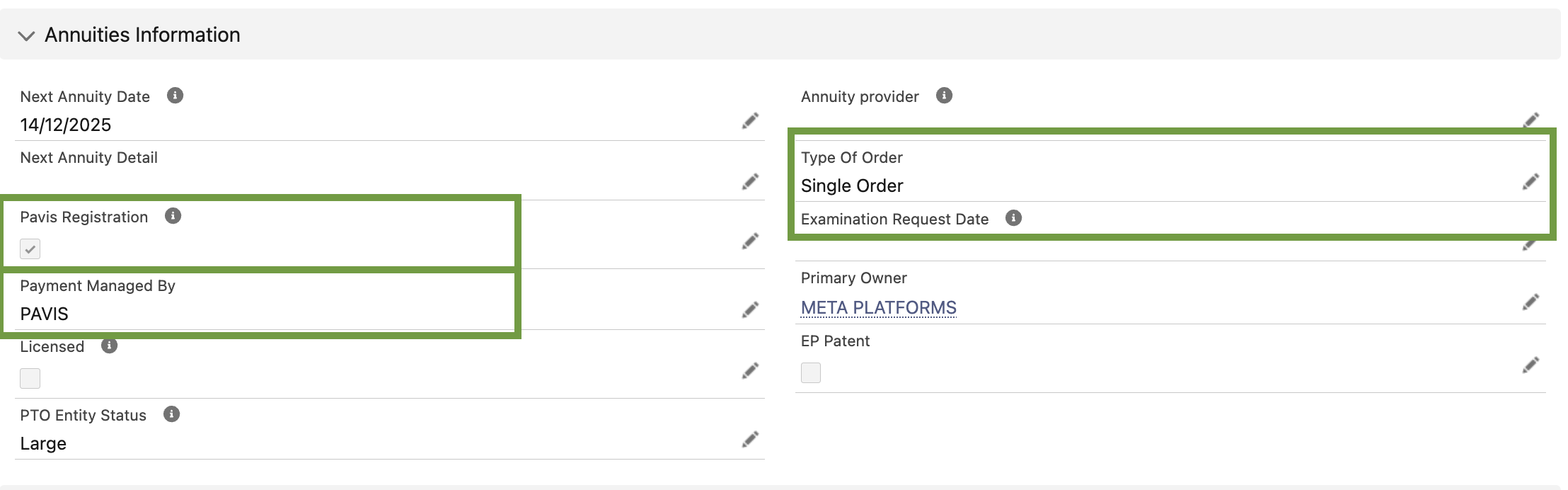
⚠️ Without this information, the instruction won't be sent to Pavis.What is the Instruction Period?
The Instruction Period is the time window during which you are allowed to update the Instruction on a renewal in EC+. Outside of this period, you are not able to edit this field.
The Instruction periods opens:
Patent/Design: when the renewal due date is in <180 days
Trademark: when the renewal due date is in <365 days
When you save an update to the Instruction, EC+ checks two dates and allows the change only if today is before at least one of them:
Order Until (provided by Pavis, when available)
Instruction Deadline (a calculated safety date used when Order Until is blank, defined by the client per case type in the Pavis Service Configuration (managed by your solution engineer))
If today > Order Until, EC+ then checks Instruction Deadline.
If both are in the past, EC+ prevents the update and shows a blocking message (e.g., “it’s too late … due to a PAVIS dependency”).
Cases Waiting for Instruction
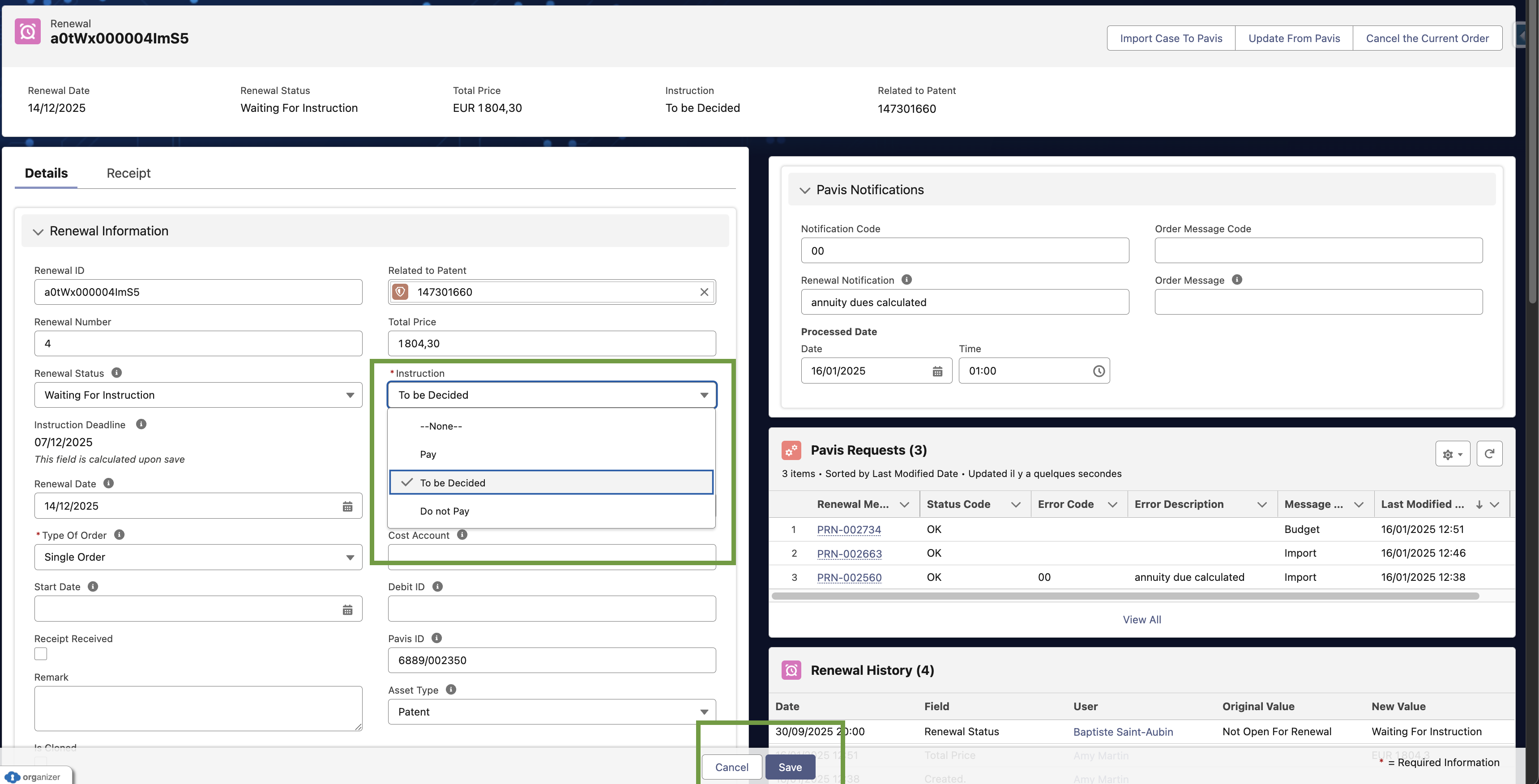
Access the "Waiting for Instruction" list view (available for patent, design and trademark)

In this list, you will have access to all renewals waiting for your instruction where the renewal period is open.
Once you have selected one renewal, you will be able to edit the Instruction field, as follows.
Don't forget to click on save to store your instruction.
Instruction Logic
Renewal Status reflects last successful flow:
Pay ⇒ Instruction Sent.
Do not pay ⇒ Won’t be Renewed.
Any error ⇒ Pavis Error (dedicated list views highlight these).
By default, the instruction is set to "To be decided".
| User change on Instruction | EC+ pre-check | Renewal Status |
|---|---|---|
| To be decided → Pay | Must be before Order Until or Instruction Deadline. | If successful, Instruction Sent. If error, Pavis Error. |
| To be decided → Do not pay | Same deadline rule. | If successful, Won’t be Renewed If error, Pavis Error. |
| Do not pay → Pay (user reconsiders) | Same deadline rule. | If successful, Instruction Sent. If error, Pavis Error. |
| Pay → Do not pay | Same deadline rule. | If successful, Won’t be Renewed If payment already processed ⇒ no change + blocking message. |
Instructions: Step-by-step
Send Pay
Open Renewal (Type of Order = Single Order) with Renewal Status = Waiting for Instruction.
- Set Instruction = Pay.
- Save (only if before Order Until or Instruction Deadline).
- EC+ calls Pavis, updates Renewal information, sets status to Instruction Sent.
- A Pavis Request record is created with request/response payloads for audit.
Send Do not pay
Open Renewal (Type of Order = Single Order) with Renewal Status = Waiting for Instruction.
Set Instruction = Do not pay and Save (only if before deadline).
EC+ calls Pavis, updates Renewal information, sets status to Won’t be Renewed.
- The case status is updated to Abandoned and Abandon Date = today.
- A Pavis Request record is created with request/response payloads for audit.
Revert Do not pay → Pay
Open Renewal (Type of Order = Single Order) with Renewal Status = Won't be Renewed.
Set Instruction = Pay and Save (only if before deadline).
- EC+ calls Pavis, updates Renewal information, sets status to Instruction Sent.
- A Pavis Request record is created with request/response payloads for audit.
Stop an already sent instruction (Pay → Do not pay)
Open Renewal (Type of Order = Single Order) with Renewal Status = Instruction Sent.
Set Instruction = Do not pay and Save (only if before deadline).
EC+ calls Pavis to confirm if cancelation is possible. If yes, EC+ proceeds with Cancelation and sets status to Won't be Renewed. If payment is already processed, the cancelation request is blocked.
- Payment_status in {01, 02, 03, 04} = Cancellation OK.
- Payment_status in {05, 06} = Cancelation blocked.
- A Pavis Request record is created with request/response payloads for audit.
Grace Period: How to instruct after the instruction deadline?
Users are able to send or change renewal instructions after the due date for Single Orders—within the legally allowed grace period—while staying aligned with Pavis order deadlines.
Scope & Prerequisites:
- Applies to: Patents & Designs managed by Pavis, Type of Order = Single Order. (Standing Orders are excluded.)
Feature enabled in EC+: Solution engineers must enable Use grace period in Pavis Service Configuration.
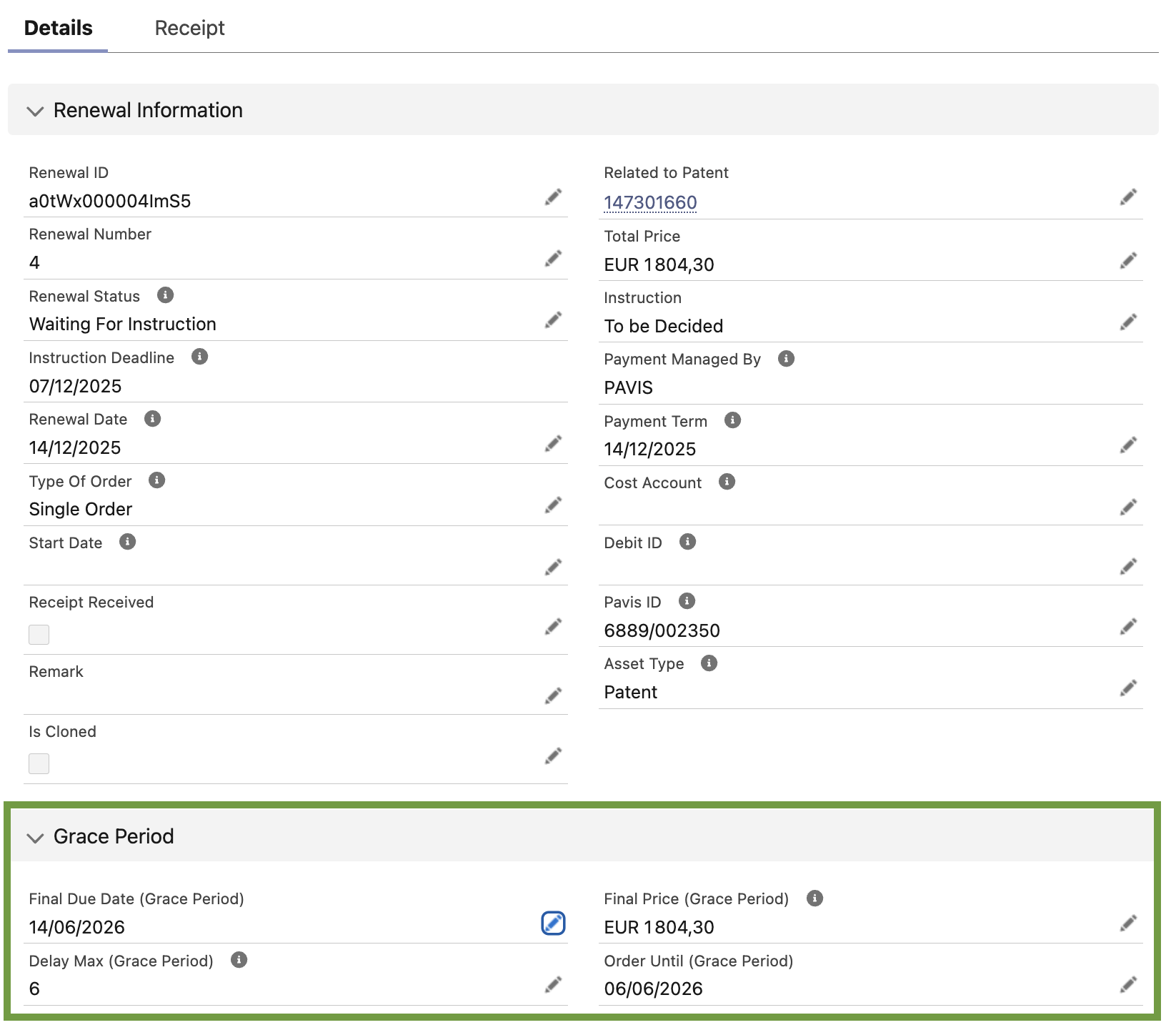
The Grace Period is a post-due date window during which EC+ allows you to send or change instructions (Pay / Do not pay / To be decided), guarded by Pavis' Order Until (Grace Period) field. If today is after the guard, the change is blocked.
The guard EC+ uses:
- When Use grace period is enabled → EC+ checks Order Until (Grace Period)
When Use grace period is disabled → EC+ checks Instruction Deadline
What you’re allowed to do during the grace period:
| From → To (Instruction) | Allowed during grace? | What EC+ does | Typical outcome |
|---|---|---|---|
| Do not pay / To be decided → Pay | Yes, no explicit EC+ date limit; PAVIS’ Order Until (Grace Period) guards acceptance | Sends Direct instruction to Do Not Pay to Pavis | Renewal Status = Instruction Sent, price updated; else error if PAVIS rejects (too late) |
| Pay → Do not pay / To be decided | Yes, guarded by PAVIS | Runs History then Cancellation (if payment not yet processed) | blocked if payment already progressed past allowed status |
| Abandoned → Pending (asset previously abandoned) | Yes, when grace is active and still before Order Until (Grace Period) | Keep the old renewal (don’t delete), set PAVIS Registration = false, and create a new renewal by getting all the updated information from Pavis (dates, prices) | New renewal becomes live; old one remains as historical (Abandoned) |
What happens when it’s too late:
If Pavis indicates payment cannot be accepted (guard passed), EC+ blocks the save and shows:
“It’s too late, your instruction can’t be accepted by Pavis. Please contact Pavis directly.” The record stays unchanged.For Pay → Do not pay/To be decided, the History check controls whether Cancellation is still possible. If payment status says it’s already processed, EC+ blocks the change.
How are future updates to the case transferred?
EC+ starts the Bibliographic Change process as soon as you modify any “key field” on a Case that’s registered with Pavis.
EC+ only triggers this process for cases registered in Pavis (Payment Managed By = Pavis).| Case Type | Fields |
| Patent (Case status must be Granted or Pending) |
|
| Trademark (Case status must be Registered or Pending) |
|
| Design (Case status must be Granted or Pending) |
|
When one of the above fields is updated, EC+ looks at any existing renewal order and then decides whether to:
amend the case details with Pavis; or
cancel an in-progress order first, then amend.
You don’t choose the flow—EC+ does it for you. You just save your changes.
Changing the Type of Order
Keep EC+ and Pavis aligned when you decide to stop automatic renewals (Standing → Single) or to start automatic renewals (Single → Standing). The system sends the right update to Pavis, when needed, Cancellation, and updates the linked Renewal.
A) Standing → Single (stop automatic renewals)
Open the Case (Patent/Design) with Type of Order = Standing Order and Case Managed By = Pavis.
Change Type of Order to Single Order and Save.
What EC+ does:
Sends the update to Pavis.
If renewal had Instruction = PAY, sets Instruction = To be decided (when within the instruction period).
If Pavis shows the renewal already started, EC+ cancels the order before applying the change.
Result:
If Order Until / Instruction Deadline is in the future → Type of Order updated and Instruction set to To be decided (status unaffected).
If in the past → only Type of Order is updated (no Instruction/Status change).
On success: “Your case has been updated.”
On failure: “Your case cannot be updated because of a Pavis dependency…”
B) Single → Standing (start automatic renewals)
Open the Case (Patent/Design) with Type of Order = Single Order and Case Managed By = Pavis.
Change Type of Order to Standing Order and Save.
What EC+ does:
Sends the update to Pavis.
Sets Instruction = PAY on the active renewal.
When still within the instruction period, EC+ also sets Renewal Status = Instruction Sent.
Result:
If Order Until / Instruction Deadline is in the future → Type of Order updated and Instruction = PAY (status may move to Instruction Sent).
If in the past → only Type of Order is updated (no Instruction/Status change).
Success and error messages behave as above.
Abandon a case
What abandoning means:
You keep the record (for audit/history) but change its Status to an abandoned value (e.g., Abandoned/Withdrawn).
Steps:
- Open the case (Patent/Trademark/Design).
Click Edit and set Status to the correct Abandoned value, and Save.
If the case is registered with Pavis, EC+ sends the cancellation request based on Payment Status.
If there is no open order, EC+ sends a deletion to Pavis.
The Pavis request + outcome are stored for audit in the Pavis Request object.
Delete a Case
What deletion means:
The record is removed from EC+.
Steps:
- Open the case (Patent/Trademark/Design).
In the Actions menu, click Delete → confirm in the pop-up.
- If the case is registered with Pavis, EC+ sends the cancellation request based on Payment Status.
- If there is no open order, EC+ sends a deletion to Pavis.
- The Pavis request + outcome are stored for audit in the Pavis Request object.
- The case record is deleted in EC+
Note: Deletion from a list view is blocked by design so the API step can’t be skipped. Always delete from the record page.